Templates and Project Starters
ALCOM templates are one of its most powerful features.
For VRChat creators, templates turn project setup from a repeated chore into something you can standardize, reuse, and trust.
According to ALCOM release notes, the newer template system lets you:
- create project templates inside ALCOM
- install multiple VPM packages at once
- import
unitypackagecontent as part of the template flow - create blank projects when you want a cleaner starting point
Source:
Why Templates Matter So Much
For real VRChat work, templates are not just a convenience feature.
They help with:
- starting world projects with the same known-good package stack
- starting avatar projects without forgetting common dependencies
- avoiding setup drift between collaborators
- reducing the amount of manual setup you repeat for every new project
- making it easier to keep a personal "starter kit" for different kinds of work
If you regularly create:
- avatar test projects
- full avatar production projects
- world prototyping projects
- event or venue worlds
- stripped-down troubleshooting projects
then templates save time every single time you start over.
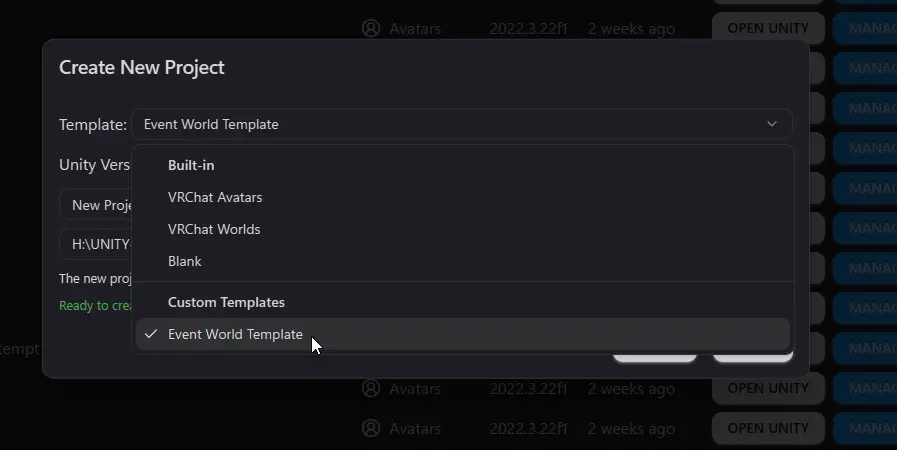
Template selection during project creation. This is where a good starter stops being an idea and becomes a real time-saver.
The Basic Template Flow
The useful way to think about templates is:
- choose a known-good starter during project creation
- let ALCOM apply the package baseline for you
- add only the project-specific extras afterward
- keep the template itself maintained over time
That keeps project creation fast without turning every new project into a dumping ground.
Good Template Use Cases
| Template type | Good for |
|---|---|
| Avatar base template | Common avatar package stack, shader stack, and your usual starting setup |
| World base template | Shared world dependencies, baseline scene setup, and repeatable project defaults |
| Test template | Fast repro and troubleshooting projects with minimal extra baggage |
| Venue or event template | A known package stack for repeated world deployments |
What Makes a Good ALCOM Template
A good template is:
- narrow in purpose
- repeatable
- built from packages you actually rely on
- easy to maintain when those packages update
Bad templates usually try to do too much at once. They turn into a giant pile of assumptions that becomes harder to trust over time.
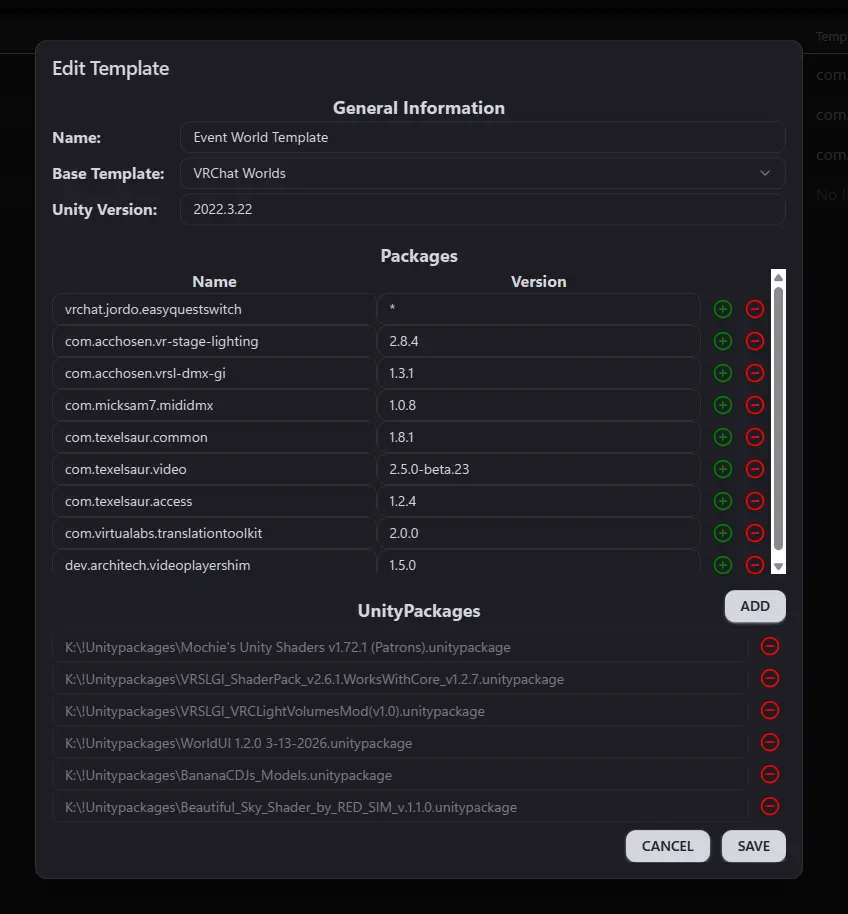
Example template. Locking packages to known-good versions can reduce surprise breakage, but it also means you should deliberately review whether those versions can be updated safely over time.
Make a small number of high-confidence templates and keep them current. A few reliable starters are much better than a huge library of half-maintained ones.
Pinning template packages to specific versions is a valid way to protect yourself from compatibility surprises, especially in VRChat projects with fragile shader or tool stacks. Just do not treat that pinned state as permanent. Revisit those versions regularly and update them when testing shows it is safe.
Practical Advice
Start with one or two templates you know you will actually reuse:
- one for avatar work
- one for world work
- optionally one stripped-down test template
Then evolve them as your workflow stabilizes.
Do not try to build the perfect mega-template on day one.
Where Templates Fit In Your Workflow
The clean pattern looks like this:
- Use a template to start from a known-good project baseline.
- Add only the extra packages the specific project actually needs.
- Keep the template itself lean and maintainable.
- Use version control once real project work begins.
That gets you the speed benefit of templates without turning every new project into inherited clutter.
Recent Template Improvements Worth Knowing
ALCOM release notes also mention a few template-focused improvements that make the system easier to live with:
- favorites for templates
- preserving the last used template
- a more capable template editor with autocomplete
- updated project settings in templates to include the Item layer
In practice, that means templates are not just a one-off novelty feature. They have continued getting workflow attention.
Read Next
- Continue to Installation and Setup for the basic first-run flow.
- Continue to Package Management for the habits that keep template-based projects healthy after creation.